接線
- LED 接到 pin9 和 GND,長腳(陽極)串接一顆 220 ohm 電阻到 pin9,短腳(陰極)直接接到 GND
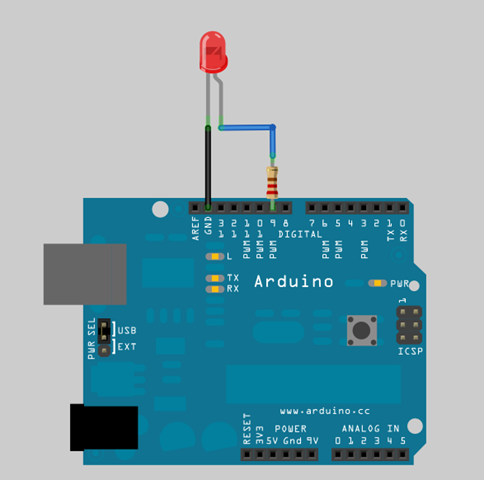
程式碼
Fading.pde
11 |
analogWrite(9, brightness); |
14 |
brightness = brightness + fadeAmount; |
17 |
if (brightness == 0 || brightness == 255) { |
18 |
fadeAmount = -fadeAmount ; |
編譯這支程式,然後上傳到 Arduino 板子上,過數秒後,就會看到 LED 燈光不斷地改變亮度,一下子漸亮,一下漸暗。
說明:
- L01: brightness 變數用來保存目前的燈光亮度
- L02: fadeAmount 變數用來設定每一次燈光亮度的調整值
- L06: 宣告 pin9 為 output pin, LED 接在 pin9 上
- L11: 使用 analogWrite(9, brightness) 設定 pin9 上的 LED 燈光亮度
- L14: 調整下一次的燈光亮度
- L17~L19: 改變 fadeAmount 燈光亮度調整值,假如 brightness 已達到最亮(255),就將 fadeAmount 改成 -5,讓燈光下一次的變化改成漸漸變暗,假如 brightness 已達到最暗(0),就將 fadeAmount 改回 +5,讓燈光下一次的變化改成漸漸變亮。
- L21: 延遲 30ms,這樣肉眼才能看得到 LED 調光的效果
以上資料出自此
我的實驗如下:


請先 登入 以發表留言。